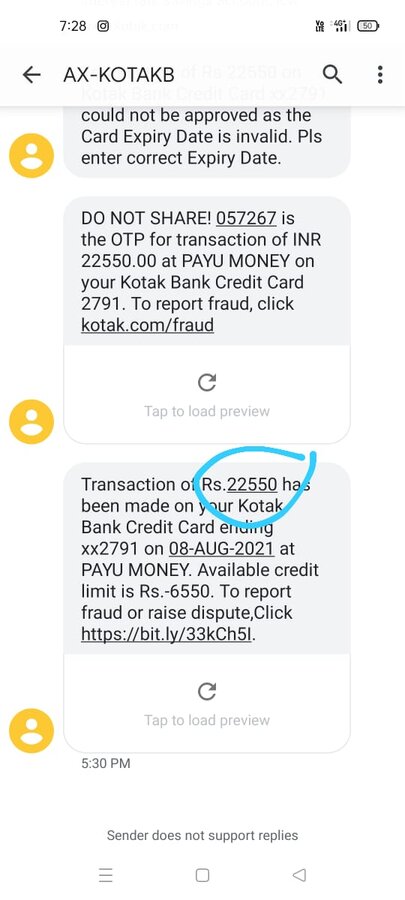
Hello sir mera 2 payment settlement ka status settled bta rha he Lekin mere account me payment nhi gya Abhi tak mera problem solve nhi hua please help kijiye sir
NAME-TARA CHAND REGAR
Merchant id -7144487
Mobile no-[protected]
PayUMoney customer support has been notified about the posted complaint.
Verified Support
Aug 31, 2021
PayUMoney Customer Care's response Hi, please be informed that we have received the NEFT return while processing your settlement. (Neft return reason -NEFT RETURN-ALL CREDITS LINKED TO ACCOUNTS MAPPED TO ANY AADHA-TARA CHAND REGAR) Kindly follow the below steps to update/change your bank details:
1. Login to your PayUmoney dashboard.
2. Click on the user icon available on the top right corner.
3. Hit Profile and then Bank details.
4. Please click on “Update your bank details”. In the pop-up window, kindly fill in the required details.
5. At this stage, you will receive an OTP on your registered mobile number, kindly enter the same. In addition to this, kindly check terms and conditions before proceeding further.
6. After OTP is verified, we will credit a small amount in your new bank account. Details of which will be visible in your bank statement.
7. To verify the bank, please enter the amount that has been deposited in the account.
Sep 01, 2021
Updated by Tara6376 सर बैंक अकाउंट को अपडेट करने की request payumoney चैट support पर HB[protected]
TICKET NUMBER हे पर request पहले ही सबमिट कर दी हे लेकिन अà¤à¥€ तक मेरा 3 settelment का पेमेंट मेरे registred बैंक खाते में नही आया हे मेने ईमेल पर बैंक statement à¤à¥€ uplod कर दिया हे आपसे मेरा अनà¥à¤°à¥‹à¤§ है कि मेरा 3 पेमेंट सैटलमेंट का पैसा मेरे रजिसà¥à¤Ÿà¤°à¥à¤¡ बैंक खाते में जलà¥à¤¦à¥€ से जलà¥à¤¦à¥€ करवाया जाठधनà¥à¤¯à¤µà¤¾à¤¦ NAME-TARA CHAND REGAR Merchant id -7144487 Mobile no-[protected]
Verified Support
Sep 03, 2021
PayUMoney Customer Care's response Hi, please be informed that we have received the NEFT return while processing your settlement. (Neft return reason -NEFT RETURN-ALL CREDITS LINKED TO ACCOUNTS MAPPED TO ANY AADHA-TARA CHAND REGAR) Kindly follow the below steps to update/change your bank details:
1. Login to your PayUmoney dashboard.
2. Click on the user icon available on the top right corner.
3. Hit Profile and then Bank details.
4. Please click on “Update your bank details”. In the pop-up window, kindly fill in the required details.
5. At this stage, you will receive an OTP on your registered mobile number, kindly enter the same. In addition to this, kindly check terms and conditions before proceeding further.
6. After OTP is verified, we will credit a small amount in your new bank account. Details of which will be visible in your bank statement.
7. To verify the bank, please enter the amount that has been deposited in the account.






![Institute of Banking Personnel Selection [IBPS]](/img/no-image.png)
We are unable to trace any transaction with the provided details. Please share the below details with us via https://help.payu.in/ and we shall assist you further.
• PayU, Merchant and Bank reference number.
• Scan copy of bank statement indicating the debit for the required transaction.
• Transaction date along with the amount.
• Email id or phone number used for processing the transaction.
• First 6 and last 4 digits of your card.
• UPI / VPA if any used
Regards,
Team PayU